
The exact infrastructure used for an nService installation is largely dependent on scale of use, any existing suitable infrastructure and preference. The following therefore should be used as a guideline, with further information supplied based on your proposed configuration.
Single Site Installation
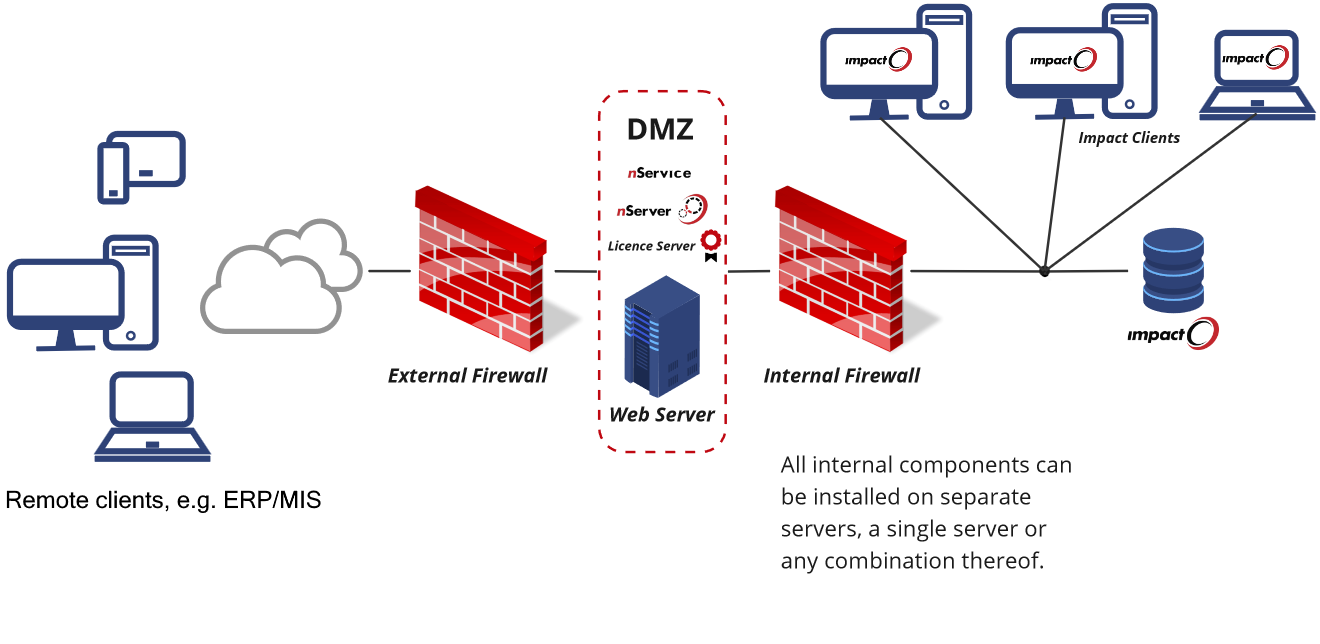
The most common and straightforward configuration makes use of an existing Impact database server, and simply adds a new web server configured to run nService's various components. This web server would typically run nService, nServer and Licence Server, and sometimes, Impact Lens as an optional web-based CAD viewer, and communicate with the databases through the Internal Firewall.
nService is very flexible in where the various component parts are situated and supports combinations from everything installed on a single server to each individual component being installed on their own servers.
Software Requirements
nService
- Microsoft Windows Server 64-bit (version 2016 or later), configured as a Web Server
- IIS 10
- .NET Framework 4.8
- Suitable client database drivers - see Databases
nServer
- nServer compatibility to be confirmed for each nService release
- O/S requirements to match nService
- Suitable client database drivers - see Databases
Licence Server
Arden Licence Server is required by nServer, and is therefore typically installed alongside nService on the web server itself, and has no specific software or hardware requirements*. Should the use of an existing and/or separate Licence Server installation be desired, any network traffic would need to be allowed to flow between the web server and the alternate Licence Server host, as detailed in the relevant KB articles, here.
*Licence Server installations on physical servers may optionally utilise a physical USB dongle.
Databases
nService connects to the existing Impact database (via nServer) for user, customer, and design data. The minimum supported database platform for Arden products follows the Microsoft SQL Server Extended End Date. See here for details. As each version of SQL Server Microsoft's products reach their supported end-of-life, Arden products will similarly cease to support them for subsequent product releases.
- Recommended: SQL Server 2016 / 2017 / 2019 / 2022 / 2025 - Workgroup, Standard, or Enterprise Edition
Hardware Requirements
Our hardware recommendations are based on a customer's intended scale and nature of use, as determined by their site's configuration and the licensed nServer modules. The following is also based on the assumption that the Web Server is to be dedicated to hosting nService, and that the nServer component is both installed alongside it, and is also dedicated to only nService specific usage.
- CPU (Processor)*:
- x86-64 compatible processor (Intel® or AMD®)
- Up to 5 CALs**: 4 cores (or logical processors in a VM)
- 5-10 CALs**: 6-8 cores
- 15+ CALs**: 10 + 2 cores per additional 5 CALs
- RAM (Memory)
- 3-4 GB per allocated CPU core
- Disk
- SSD or equivalent high-speed disks
- 25 GB disk space
- Network
- 1 - 10 Gbps+ network card(s)
- GPU
- No requirement / usage capab
*An important consideration with processor selection for an nServer host is that those CPUs with higher clock speed tend to perform more strongly than those with more cores. Each CAL / nServer process can operate on only one core at a time, so maximising per core throughput is most beneficial. For this reason, please pay particular attention to the 'single thread speed' (aka 'single core speed') offered by each available CPU. >2,000 is OK, >3,000 MOps/Sec is good, >4,000 MOps/Sec is best.
** Client Access Licences, i.e. capable of concurrent requests
Port Configurations
Below, you can find the ports which need to be open/available for proper functioning of nService in a single site (non-Enterprise) installation:
- Port 80 (HTTP) from the internet to the nService Web Server (DMZ), Or
- Port 443 (HTTPS) from the internet to the nService Web Server (DMZ)
- Port 80 (HTTP) from the LAN to the nService Web Server (DMZ) Or
- Port 443 (HTTPS) from the LAN to the nService Web Server (DMZ)
The following ports are those most typically required for connection to a Microsoft SQL Server hosted Database:
- Port 1433 (TCP) from the nService Web Server (DMZ) to the Database server
- Port 1434 (TCP) from the nService Web Server (DMZ) to the Database server
Note. These port configurations are based on Arden Licence Server being located on the nService Web Server, otherwise, refer to the Arden Licence Server documentation on the required TCP/IP and UDP Ports.