
This is essential reading if you are planning to upgrade your Impact workstations and database to Impact CAD 2026 (v15.x). Please ensure you have read and understood all aspects described before you proceed. If you are unsure about anything covered here, please contact your support representative.
WARNING: This document covers the Impact CAD 2026 release (v15.x). If you are upgrading across several Impact releases, please review the release notes for each intermediate version before proceeding.
Licensing
Before proceeding with an upgrade, please ensure that all of your licences allow the use of Impact CAD 2026 (v15.x). You can check the maximum supported major version for a workstation licence via Help > About Impact... > General > Maximum Major Version.
If you are using software-based Nalpeiron licences, the licence on each workstation may need to be activated again after upgrade. If you are using Arden Licence Server, you will likely need to install updated licence (.LIC) files.
Licensing in Impact CAD 2026
Impact CAD 2026 uses the same licensing mechanism as Impact 2016 R4 (10.3.1.0) and later. If you are upgrading from an earlier version, you will need new licence codes in order to run Impact, so please ensure these have been obtained before you upgrade.
From Impact 2023 (v13) onwards, each major version of Impact must be activated separately. Different major versions can no longer share a single activation. This means that activating Impact CAD 2026 may first require an earlier installation, such as Impact 2016 R4 through Impact 2024, to be deactivated.
For customers who use deployment tools to install Impact clients across a wider company network, it is also possible to activate Impact automatically during start-up using registry keys. Your support representative can provide further information if required.
Note: For security purposes, the Offline / Manual activation process changed in Impact 2023 and later. Please refer to the updated article Activating and Deactivating Your Nalpeiron Licence Manually (Offline).
Designer Licences - All levels
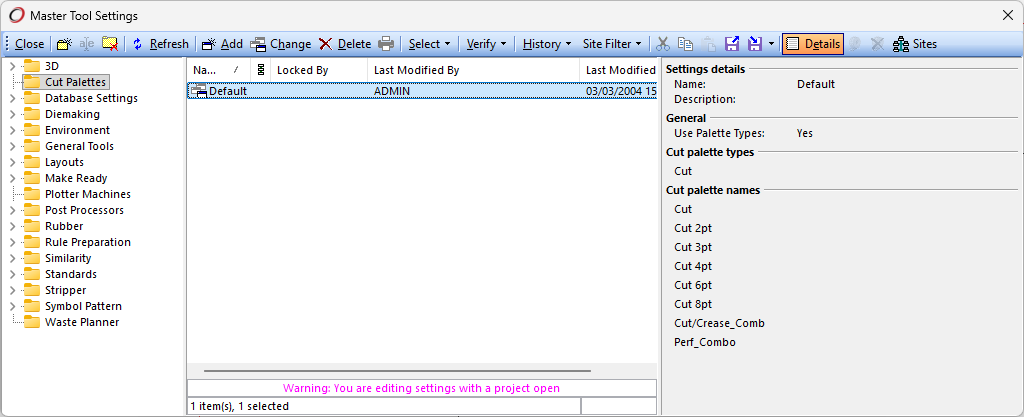
Designer licences now include the ability to access and manage Cut Palettes master tool settings. These settings are used by both the Create Common Knife Block and Stripping Knife tools. The Stripping Knife tool became available to Designer Professional level licences in Impact 2024.
Designer Professional Licences
Designer Professional licences now include the new Design Similarity feature, controlled by the new Similarity Essentials module.
Diemaker Professional Licences
Diemaker Professional licences now include the new Design Similarity feature, controlled by the new Similarity Essentials module.
3DX
The use of 3DX for extended 3D file format support is now controlled by the 3DX Import Library V2 licence module. Customers who previously purchased 3DX will have previously seen 3DX Import Library V1 enabled. This will be replaced during the licence upgrade to Impact CAD 2026 or later.
Impact CAD 2026 v15.0 introduces the updated 3DX Import Library V2. 3DX export support is planned to follow in Impact CAD 2026 Service Pack 1.

Offline Virtual Machine (VM) Licensing
Impact can now retain activations for workstations identified as Virtual Machines (VMs). This can include systems identified as virtual due to one or more BIOS or Windows 10/11 security features.
This prevents Impact from needing to be reactivated on each start-up, allowing affected workstations to continue operating offline in the same way as workstations identified as physical machines.
If the Nalpeiron activation servers are inaccessible, unresponsive or degraded, Impact can continue to function for both new and ongoing sessions, provided the workstation remains within its valid lease period.
The default grace period before Impact must extend its lease through the Nalpeiron activation server, my.nalpeiron.com, is now 28 days for virtual machines. This matches the default behaviour for physical machines.
Operating Systems Compatibility
Impact CAD 2026 is recommended for use with Windows 11.
Some earlier Windows client operating systems may remain technically compatible in existing environments, but they are not recommended for new installations where the operating system is outside mainstream vendor support or no longer receives security updates. Customers running older Windows versions should review the full system requirements and consult their support representative before upgrading.
For further details, refer to the complete Impact CAD 2026 (v15) System Requirements documentation.
Database Servers Compatibility
For details on supported database servers, please refer to Impact CAD 2026 (v15) System Requirements.
For the Design Similarity feature, SQL Server 2016 or later should be considered. Later SQL Server versions provide significant performance improvements when locating matches due to enhanced use of index-related features available in SQL Server 2016 and later.
Database Drivers
Impact supports the following ADO drivers for SQL Server, listed in order of preference:
- Microsoft OLE DB Driver for SQL Server (MSOLEDBSQL) - Recommended
- Microsoft OLE DB Provider for SQL Server (SQLOLEDB)
- SQL Server Native Client (SNAC or SQLNCLI)*
* SQL Server Native Client (SNAC or SQLNCLI) is now considered a legacy driver, while Microsoft OLE DB Driver for SQL Server (MSOLEDBSQL) is considered to offer superior performance as well as active development and ongoing OS support.
We also recommend using ODBC or ODBCDIRECT connections for Impact nServer because they are generally faster and require less memory when used at scale.
WARNING: MySQL is not supported from Impact CAD 2026 (v15) onwards.
Database Structure
When upgrading the database to Impact CAD 2026 status, the following database structure changes will be required. Please ensure that you have an up-to-date database backup, taken immediately before you proceed with the upgrade. No users should be connected during the database upgrade.
- MACROS - table MACROS modified to support the new Custom Tool Builderfeature
- MAC_SIC (Boolean) - appended
- MAC_TYPE (Integer) - appended
- MAC_TLCODE (Integer) - appended
- MAC_GUID (Character) - appended
- MAC_PROP (Picture) - appended
- MAC_ICON (Picture) - appended
A full database backup should always be taken before any Impact upgrade. This provides a restore point if anything goes wrong and helps avoid data loss or system downtime.
Post-Upgrade Considerations
Where possible, each Impact release is intended to limit breaking changes or drastic changes in behaviour. In some cases, however, a behaviour change may be unavoidable, or a previous issue may have been corrected where a workaround had been used.
This section details potential breaking changes and improvements you may wish to implement after upgrade. Please also review the supporting What's New in Impact 2026 article to review new features that may require further configuration.
Design Similarity
The Design Similarity feature lets you compare a design in the currently active layer against other designs in your design database. Only designs that have already been processed and indexed will be included in the comparison, so you may want to run a bulk process on existing drawings if you plan to use this feature.
Similarity scanning can be performed in one of two ways:
- Automatically on save (optional):
Go to Options > Environment > Workstation > Options and enable Perform automatic similarity scan for projects saved on this machine. This option is enabled by default. - As a bulk operation after an upgrade:
Go to Database Administration > Tools > Similarity > Similarity Scan.
Before running a Similarity Scan, review the Similarity Scan Rules under Database Installation > Similarity to ensure that only relevant layers and palettes are included. Changing these settings later will invalidate existing scan results.
Tool Builder
Tool Builder provides the opportunity to improve design processes by reducing clicks and reducing dependency on automation scripts for common tasks.
No post-upgrade action is specifically required for Tool Builder. However, you may wish to review existing design workflows and consider whether custom tools should be created to simplify or standardise common operations.
Custom tools can also be shared, including publication to Enterprise-enabled site databases, either with all users or with selected individuals. Administrators with access to Database Installation > Automation features may therefore wish to manage custom tools on behalf of other users.
Impact 3DX V2
The move from Impact 3DX V1, compatible with Impact 2010 through Impact 2024, to Impact 3DX V2, compatible with Impact CAD 2026 and later, corresponds to a change in the underlying file translation library from Tech Soft 3D HOOPS to Dassault Spatial technology.
As part of this change, the range of supported file formats and versions has been updated. Customers using 3DX should review their 3D Import / Export Settings to ensure that the relevant settings for each file format are configured as required.
This will help avoid the commonly encountered error, 'No settings with the specified file format could be found'.
Impact CAD 2026 v15.0 includes the updated 3DX import implementation. 3DX export support is planned to follow in Impact CAD 2026 Service Pack 1.

Refer to the following articles for further details:
- Which file format versions does 3DX v2.0 support
- Import/Export File Formats
Python-based Scripting Language Support
Impact CAD 2026 adds support for Python-based scripting, allowing users to write automation scripts using Python while retaining support for existing VBScript-based automation.
Python version 3.14.3 is embedded with Impact, so there is no requirement to install Python separately.
Microsoft has deprecated VBScript in Windows. VBScript remains supported in Impact CAD 2026, but customers who rely heavily on VBScript-based automation should consider reviewing their existing scripts and planning a gradual move towards Python where appropriate.
nServer does not initially support Python scripts. Support for Python scripts in nServer is planned for a future release.
Arden Software can be consulted if you wish to discover where existing VBScript-based automation scripts may be present within your database configuration. A conversion or consultation service can also be provided on request.
Refer to Microsoft's article for further details relating to VBScript deprecation: Timelines and next steps.
Standards Libraries v120
Impact CAD 2026 includes updated Standards Libraries (aka Sets) v120, providing a larger and more clearly organised set of parametric styles for carton, corrugated, display, board, bag, PET/PP and related packaging work.
The FEFCO Corrugated library has been updated to match the FEFCO Code 12th Edition, including the new 0800 Retail & E-commerce Packaging group. The ECMA Folding Carton library has also been expanded, and new or restructured libraries have been added for assorted folding carton, corrugated board, paper bag, PET & PP and experimental ALU Composite styles.
Standards Libraries v120 are compatible with Impact 14.0.1.0 and later. Customers upgrading standards libraries should review any local standards, customisations or master tool settings before replacing production library content.
Impact Plug-ins and Automations
Selected Impact plug-ins and automations are available for customers with specific workflow requirements. These are designed to extend Impact in focused areas such as workflow automation, integration or specialist production support.
Impact plug-ins and automations are not included in the default Impact CAD 2026 installer or standard download. Customers using existing Impact plug-ins, or wishing to request additional plug-ins after upgrade, should contact their Impact support representative to confirm compatibility, availability, installation requirements and any licensing considerations.
New Tools
This version introduces several new tools, so users may wish to update their appearance settings to include these. Each user will be prompted to do this when they first log on.
The following new Impact tools are introduced in Impact CAD 2026:
| Tool Name | Tool Group | Default Location |
|---|---|---|
| Design Similarity | Utility Tools | Utilities > Design Similarity |
| Dimension Wobble | Dynamic Constraint Tools | Edit > Dynamic Constraints > Dimension Wobble |
| Wobble Variable | Dynamic Constraint Tools | Impact Explorer > Variables context menu |
Also note the introduction of various Similarity data management tools within Database > Administration > Tools > Similarity.
New & Changed User Privileges
The following changes have been made to User Privileges in this version and should be considered before upgrade.
New Privileges
- Database > Similarity > Design Search (pDBSimilarityAllowLayerSearching) - Enable this option to allow the user to search for design similarity entries using the Design Similarity tool. Access to Similarity Scan is controlled by the pre-existing Database > Administration privilege (pDBAdministration).
Changed Privileges
No existing privileges have had their behaviour changed.
New & Changed Database Installation Options
The following changes have been made to the Database Installation configuration and should be considered before upgrade.
New Options
- Similarity section introduced, allowing configuration of Similarity Scan Rules and Similarity Search Timeout.
Changed Options
- Automation > VBScript renamed to Scripts to reflect support for both VBScript and Python.
- Automation > Tools section extended to support Custom Tool Builder.
New & Changed Database Operation Options
The following changes have been made to the Database Operation options and should be considered before upgrade.
New Options
- N/A
Changed Options
- N/A
COM API Changes
The following additions and changes have been made to Impact's COM interface. Please contact your support representative for help with these enhancements.
Support for Python-based scripting has been added to Impact, allowing users to write scripts using Python while maintaining compatibility with VBScript.
The initial implementation makes Python scripts available in the following areas:
- Impact Script Toolbox
- Custom Menu Items
- Database Window Button-type Fields
- Database Window Automation for Database Tasks (CUSTOMER table only)
- Impact Auto-Tasks (Database Installation > Automation > Auto-Tasks)
- Script Includes (Database Installation > Automation > Scripts - renamed from VBScript)
- Auto-Number Automation Script-type Parts
- Standards Designer > Geometry Construction Scripts
A new Language selection is available in the Script Toolbox, Script Include and Select Automation dialogs, allowing users to choose between VBScript and Python.

Python version 3.14.3 is embedded, meaning it is shipped and installed as part of Impact. There is no requirement to install Python separately.
The following objects, methods and properties are new in version 15.0:
- IViewSettings.underdefined_geometry
- IViewSettings.dynamic_constraints
Please refer to the COM API Documentation pages to access the online documentation for VBScript and Python. CHM-based VBScript documentation remains available for download or by request.
Compatible Products
Impact CAD 2026 (v15.x) should be used only in conjunction with the following Arden products:
- Impact Viewer 2026 (v15.x)
- Arden Licence Server 2026 (v15.x)
- nServer 2026 (v15.x)
- Impact 3DX compatible with v2.0
- Enterprise compatible with v13.0.1.0 or later
- WEBcnx - compatible with any version, recommended v24.2 or later
- Lens - compatible with v1.0.0.12 or later
- Impact Plugin for Adobe Illustrator - v2.1.3.0
- TOPS - v6.8
- Manufacturing Toolbox - v3.1 or later
- Bobst PowerPack - v3.1 or later
If you use any Impact scripts, plug-ins or automations, you should ensure that they are compatible with this Impact release before upgrading.
If you have WEBcnx or nService installed, it is advisable to consult your distributor to confirm compatibility before proceeding to upgrade nServer.
Selected Impact plug-ins and automations, including Bill of Materials (BOM) for Corrugated, are not included in the default Impact CAD 2026 installer or standard download. Customers using existing Impact plug-ins, or wishing to request additional plug-ins after upgrade, should contact their Impact support representative to confirm compatibility, availability, installation requirements and any licensing considerations.
Third-party Library Updates
The following libraries have been updated:
3DX Module (Optional Expanded 3D Import/Export)
Tech Soft 3D HOOPS has been replaced by Dassault Spatial technology.
3DX export support is planned to follow in Impact CAD 2026 Service Pack 1.
Nalpeiron (Licensing)
No upgrade in this release.
Drawings (formerly Teigha Drawings from Open Design Alliance) - DXF/DWG/Collada
No upgrade in this release.
Datalogics (PDF)
No upgrade in this release.
Lead Tools (Graphics)
No upgrade in this release.
Assimp (3D Import/export)
No upgrade in this release.
Siemens (Dynamic Constraints)
No upgrade in this release.
Resolved Issues
The following issues have been addressed in this Impact release:
Impact v15.0.1.0
| Reference | Description |
|---|---|
| IM-818351 | BoxRamp issue - Cannot Save Creator Session |
| IM-818334 | DTS import - error 'User [Number] does not exist in destination database' |
| IM-818579 | Support for offline Virtual Machine (VM) usage |
| IM-818601 | Unknown error importing IPD file with Explode Beziers to arcs enabled |
| IM-818571 | DB Upgrade via script fails with APT |
| IM-817893 | Blanker Tool crash related to Visibility Settings |
| IM-818057 | Access violation when comparing layer revisions via Layer Properties |
| IM-817895 | MTS Edit crash when making a simple plotter edit |
| IM-818369 | Castle'strip and Craft'strip not merging with Interiors and Perimeter |
| IM-818194 | Rotate Tool - Retain Orientation not working properly |
| IM-818014 | Canvas is not updating after closing the Resolve Constraint Conflicts dialog |
| IM-818158 | Assertion failure with Add Coincident Constraint |
| IM-818016 | Stripper Creator - cannot place components properly after CastleTops |
| IM-818352 | Castle'strip issue - Cannot Restart Creator Session |
| IM-818205 | Many-to-Many incorrect deleted status and error 639 when deleting junction record |
| IM-817362 | Project is automatically flagged as a standard |
| IM-818350 | Double entities after importing DXF file |
| IM-817662 | Unable to change table properties after having changed its type |
| IM-817878 | Dieboard MTS has untranslated strings in preview pane |
| IM-818031 | Cannot copy dimensions with the transform tools |
| IM-818157 | DCM Help Messages |
| IM-816208 | Cut Palettes MTS should be visible for Designer licences |
| IM-817982 | Trim Fillet selected path problem |
| IM-817114 | Trim Fillet with selected path - inconsistencies |
| IM-817082 | Blanker frame allowance wrong |
| IM-818558 | Text Type Standard Items not translated |