
Overview
Impact 2026 introduces significant new capabilities for design discovery, workflow customisation, scripting and licence resilience.
The headline addition is Design Similarity, a new AI-assisted search capability that helps users find existing designs by comparing geometry rather than relying only on traditional database searches. This makes it easier to locate exact or near-matching designs, reuse previous work and unlock more value from existing design databases.
Impact 2026 also introduces Tool Builder, allowing users and administrators to create simplified, purpose-built variations of existing Impact tools. By pre-configuring options, hiding unnecessary controls and assigning custom icons, descriptions and shortcuts, teams can streamline common workflows without needing to write automation scripts.
Selected Impact plug-ins and automations are also available for customers with more specialised workflow requirements, with Bill of Materials (BOM) for Corrugated being the main plug-in focus for Impact 2026.
This release also includes 3DX Import Library V2.x, replacing the previous 3DX translation technology and extending support for newer 3D file versions. Note. 3DX export support is planned to immediately follow in Impact 2026 Service Pack 1.
Python-based scripting has been added alongside existing VBScript support, giving customers a modern scripting option for automation, integration and custom workflows. Python 3.14.3 is embedded with Impact, so it does not need to be installed separately.
Licensing has also been improved for virtual machine environments. Impact can now retain activations on workstations identified as virtual machines, reducing the need for repeated reactivation and improving offline resilience.
Impact 2026 also includes Dynamic Constraint enhancements, updated Standards Libraries, COM API additions, administration tools and a range of resolved issues - refer to the Impact CAD 2026 (v15) Release Notes for featured bug fixes.
AI-assisted Design Similarity
The Design Similarity tools provide a new way to find existing designs in Impact. Instead of relying only on traditional database queries, users can search using geometry, helping them locate exact or near matches to a closed shape or cut profile.
Design Similarity uses our own Shape Similarity technology to compare geometry. Impact performs a Similarity Scan to analyse designs in the database and generate unique fingerprints for closed cut profiles. When a search is performed, Impact compares the active drawing layer against this fingerprint library and returns matching designs that meet the selected criteria.
Search results can be refined using parameters such as Similarity Threshold, Scaling, Layer Name and Customer. Users can also apply a bespoke database query to target more specific results, such as designs for a particular customer, date range, material, project type or style.
Design Similarity can be used to search by shape alone or by shape and scale, allowing users to decide whether they are looking for a matching profile regardless of size, or a more direct match to the current design. This can be useful when checking whether a similar design, die tool, make-ready or production approach already exists.
For converters, this can help identify whether compatible die tools or make-ready already exist, review previous matching jobs, compare layout nesting approaches and support faster, more accurate quoting. For die-makers, it can help locate comparable tooling profiles and preserve useful knowledge from previous work, reducing duplicated effort when estimating or preparing future jobs.
This helps users make better use of existing design data, reduce duplication and find relevant previous work more quickly.
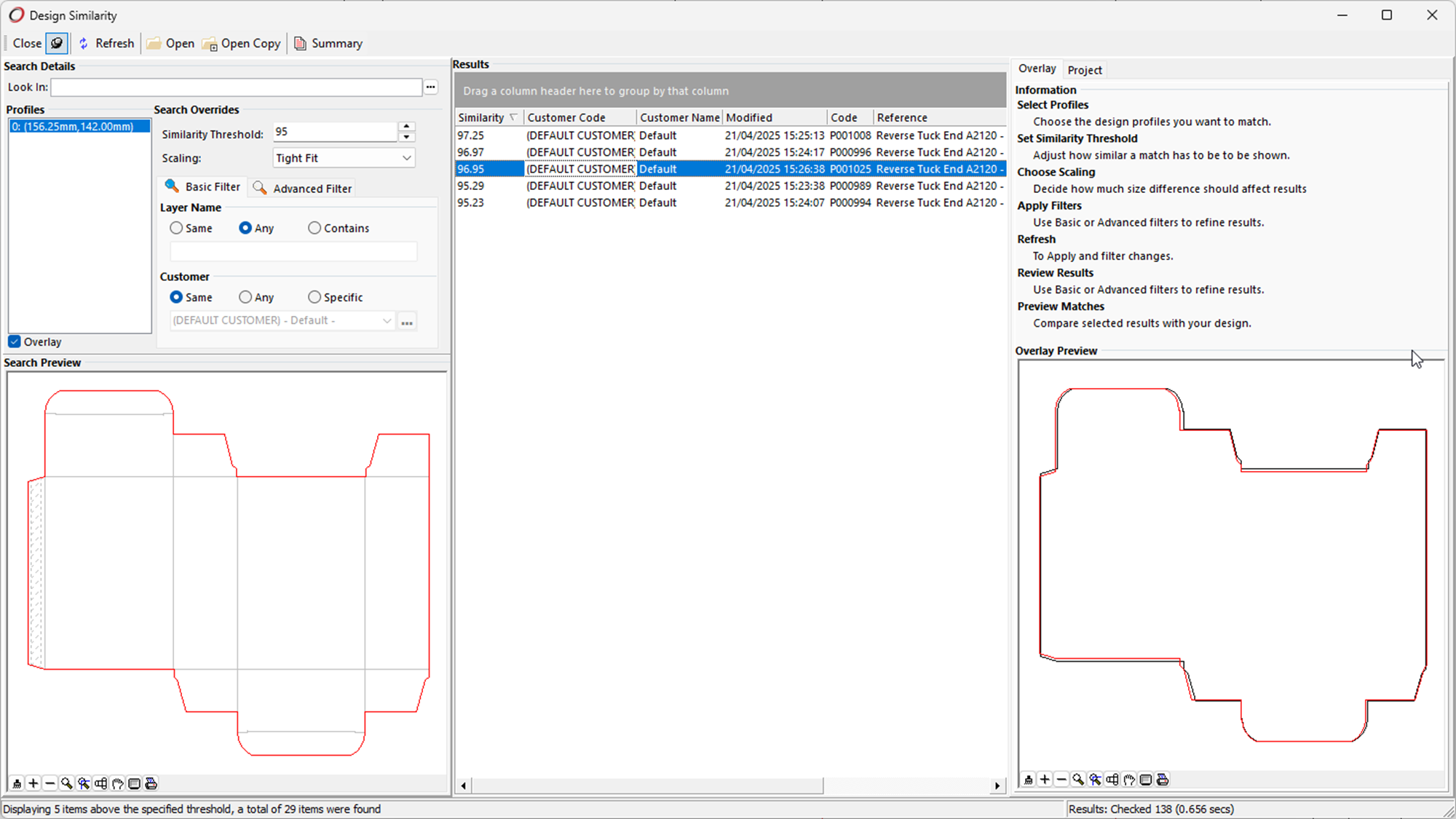
Design Similarity is available in Designer Professional and Diemaker Professional licences.
Design Similarity results depend on designs having been scanned and indexed first. For upgrade, configuration and licensing considerations, refer to the Impact CAD 2026 (v15) Release Notes.
References
IM-817484
Dynamic Constraint Parametrics Enhancements
Dimension Wobble
The Dimension Wobble tool helps users test how a parametric model responds when a length or angle dimension changes. As the selected dimension is varied, the model updates dynamically, making it easier to review behaviour, check resilience and identify unexpected constraint issues.
To use the tool, select a speed from the Edit Bar and click a parametric dimension. The selected variable is then adjusted automatically, allowing the model response to be reviewed in real time.
The tool is available from the Dynamic Constraints toolbar.
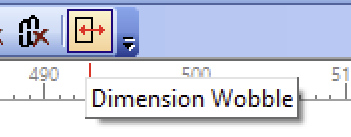
Dimension Wobble tool within the Dynamic Constraints toolbar

Dimension Wobble Tool Description

Dimension Wobble Edit Bar options

Dimension Wobble Help Tip
Wobble Variable
The Wobble Variable tool provides a similar review workflow, but starts from a selected variable rather than a selected dimension. Every dimension and expression linked to that variable is updated as the value changes, allowing users to see the effect across the wider parametric model.
The tool is available from the context menu in the Variables tab of Impact Explorer.
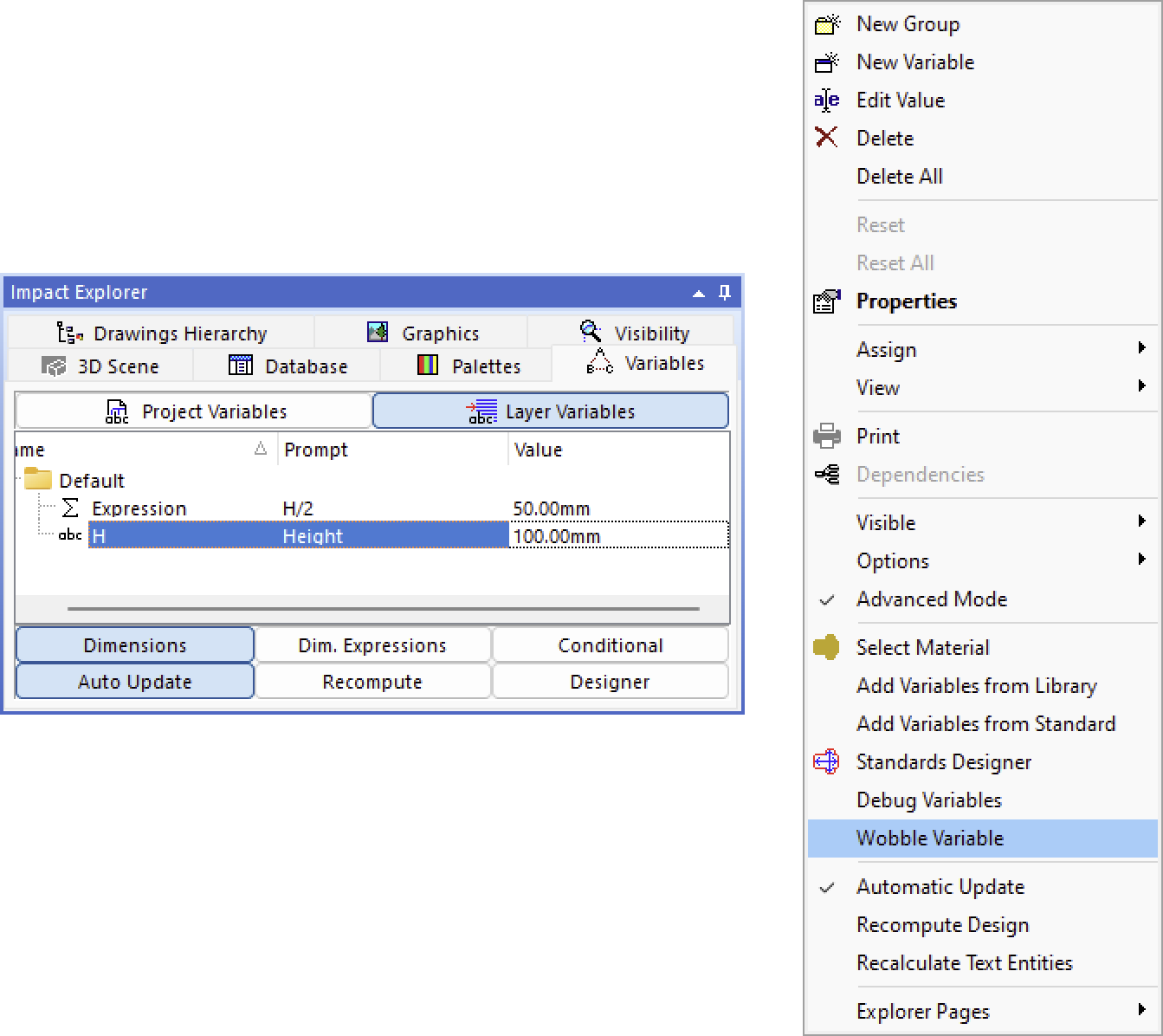
Wobble Variable tool within the Variables context menu

Wobble Variable Edit Bar options

Wobble Variable Tool Description
References
IM-814137, IM-815523
Constraint and Dimension Icon Visibility Control
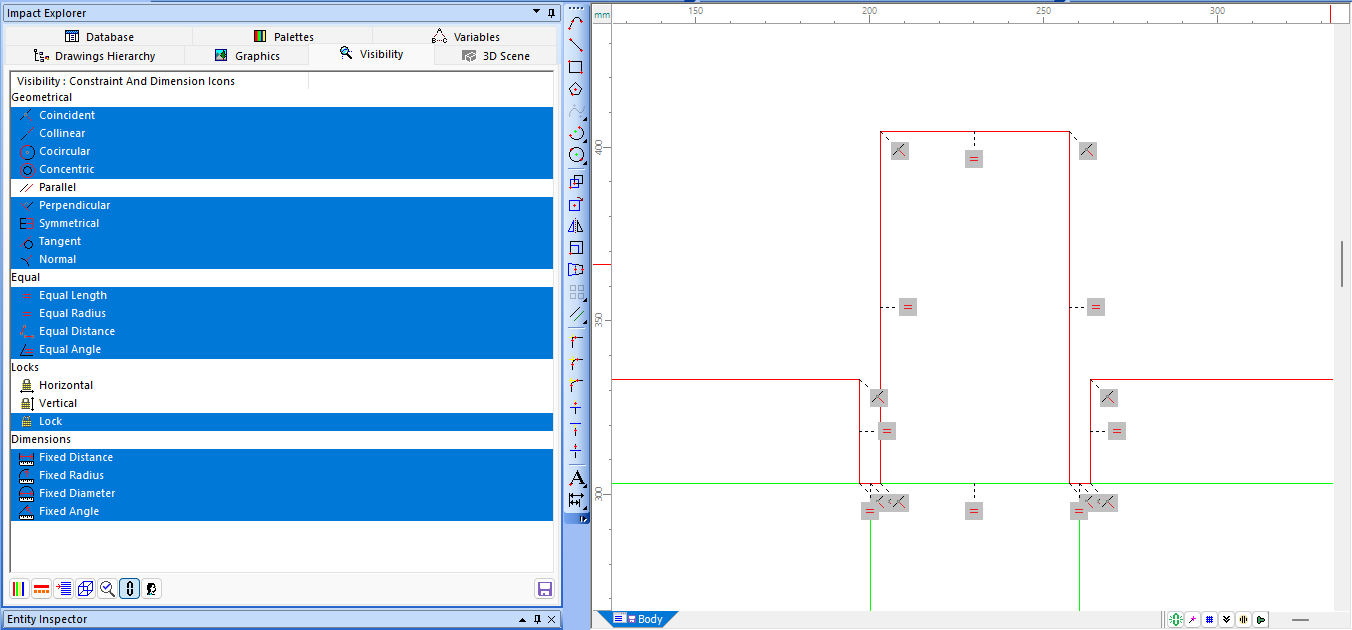
A new visibility control lets users show or hide dynamic constraint and fixed dimension icons when Constraint Manager features are enabled. This gives designers a cleaner workspace and makes it easier to focus on the most relevant areas while building models or resolving potential conflicts.
The controls are available in Impact Explorer > Visibility, with options grouped into Geometrical, Equal, Locks and Dimensions.
Custom visibility setups can also be saved and recalled through Impact's Saved Visibility mechanism, allowing users to move quickly between different review and editing tasks.
References
IM-818012
Tool Builder
Tool Builder allows users to create custom variations of existing Impact tools, making common workflows simpler and more focused without requiring scripting or automation expertise.
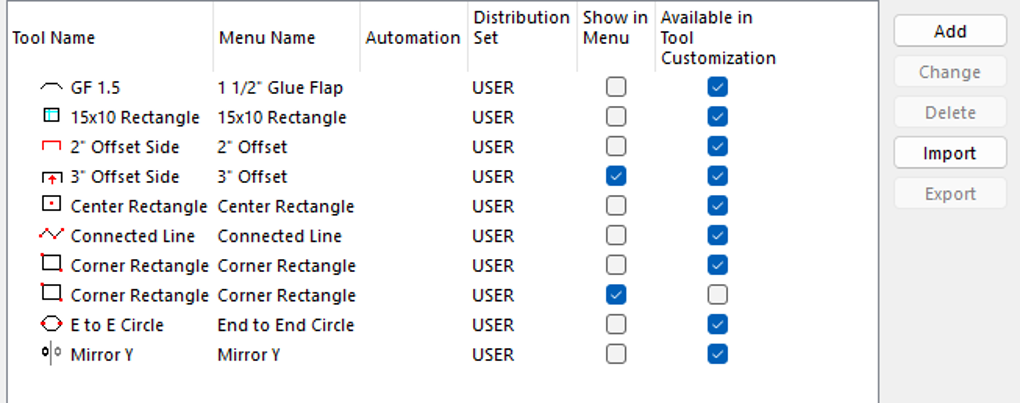
Custom tools can be created from a range of existing design and manufacturing tools, including tools such as Circle 2 Points, Rectangle, Mirror, Flatbed Stripping Knives and Nicks. Tool options from the Edit Bar can be shown, hidden or pre-configured, allowing teams to remove unnecessary choices from routine workflows.
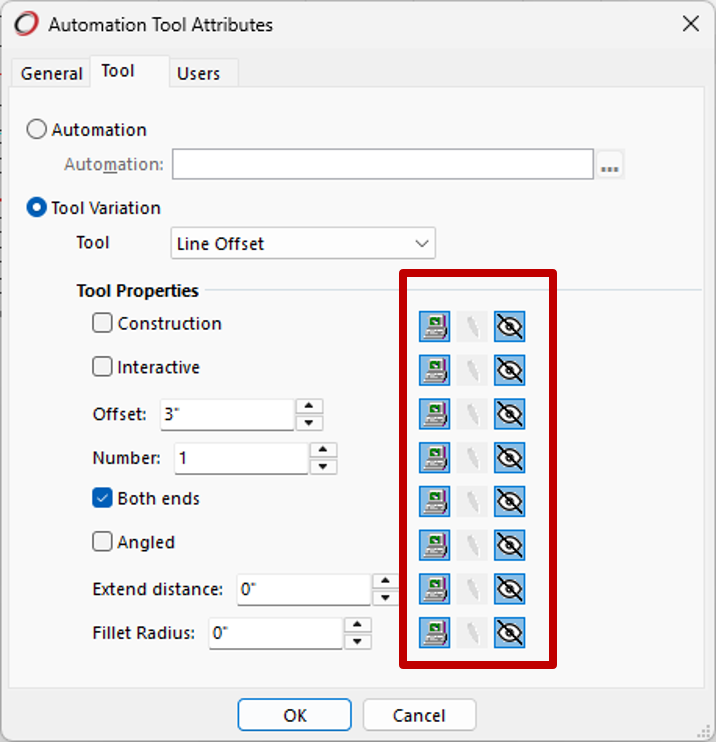
Custom tools can also be built around embedded scripts, allowing more specialised workflows to be surfaced through the Impact interface as normal tools. Access can be controlled so that a custom tool is available to selected users, or exposed more broadly across the database where it supports a shared team process.
For example, a general-purpose Circle 2 Points tool may include options such as Construction, Interactive, From Centre, Mode and Start Angle. With Tool Builder, this can be turned into a dedicated Construction Circle From Centre tool, with the required options already configured and only the relevant input, such as Radius, left visible.

Custom Tool example - bespoke Edit Bar options
Each custom tool can also be given its own description, icon, tooltip and keyboard shortcut, making it easier to recognise and use consistently across a team.

Custom Tool example - Automation Menu entry
Custom Tool example - bespoke icon and Help Tip

Custom Tool example - bespoke Tool Description
Tool Builder is intended to reduce repetitive setup, simplify commonly used tools and help teams standardise preferred working methods.
References
IM-816176
Impact Plug-ins and Automations
Alongside the core Impact 2026 release, we've made available a selection of Impact plug-ins and automations for customers with specific workflow requirements. Find them as follows in the related Impact 2026 plug-ins section:
These plug-ins are designed to extend Impact in focused areas, providing additional workflow automation, integration or specialist production support without changing the core Impact installation for all users.
Impact plug-ins and automations are not included in the default Impact 2026 installer or standard download, but many are made available for download within the Downloads > Impact Plug-ins section.
Customers interested in using these tools should first consider contacting their Impact support representative to discuss availability, installation, licensing and suitability for their environment.
Bill of Materials (BOM) for Corrugated
A key plug-in focus for Impact 2026 is Bill of Materials (BOM) for Corrugated.
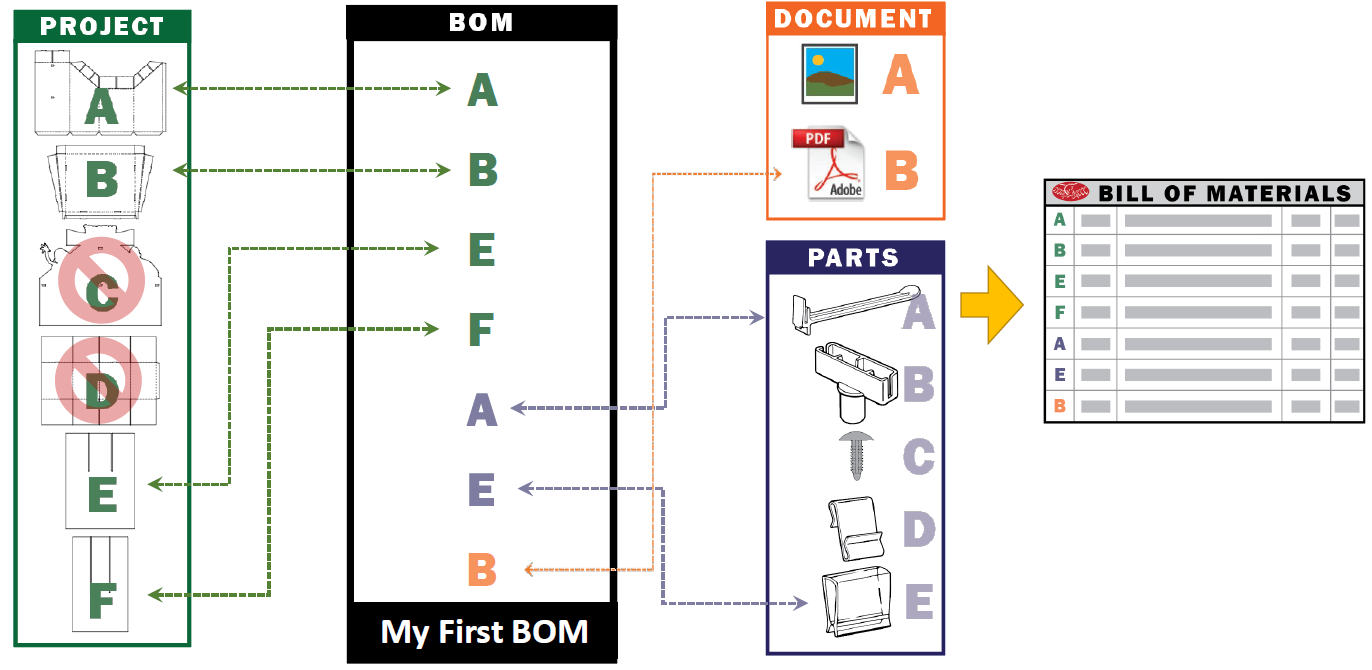
BOM for Corrugated provides a structured way to define the related items required to build one or more solutions within an Impact project. This can include project layers, documents, parts and other supporting components that need to be represented clearly for production, reporting or downstream use.
The plug-in helps reduce the need to create excessive or duplicated project layers simply to hold related manufacturing information. Instead, BOM data can be stored where it belongs, helping to reduce redundancy, improve data integrity and lower project overhead.
BOM for Corrugated also provides a customisable reporting workflow, allowing users to generate multi-page reports that present project-specific details in a clear and consistent format.
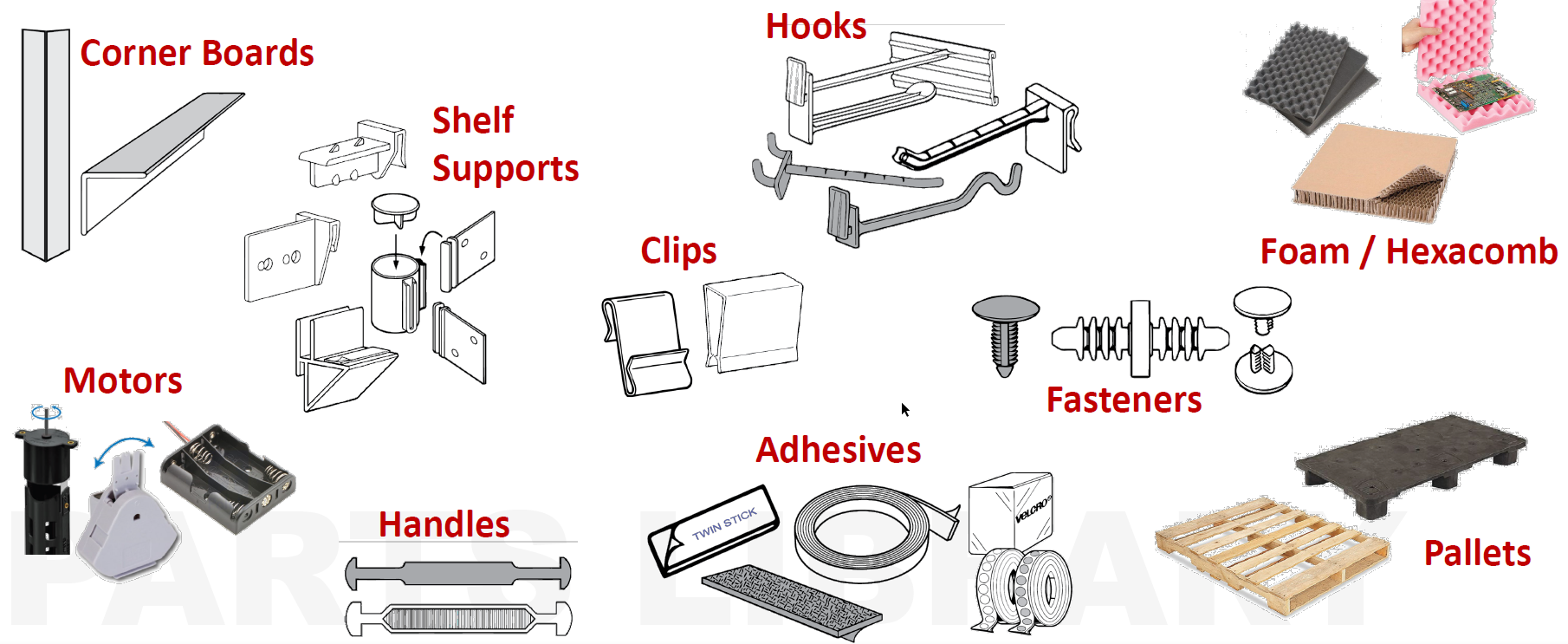
The plug-in includes access to a large parts library, with more than 900 part records covering items such as corner boards, shelf supports, motors, pallets, foam and Hexacomb materials, handles, adhesives, hooks, fasteners and clips.
BOM Part Placement
BOM Part Placement complements the Bill of Materials workflow by helping users place suitable related designs more efficiently.
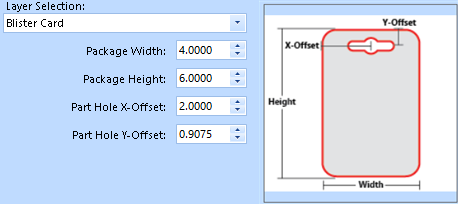
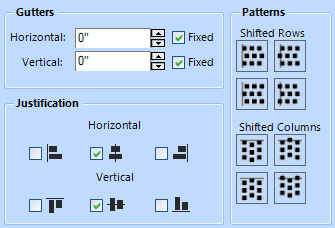
The tool can detect suitable designs and automatically populate relevant dimensions. It also provides flexible placement controls, including margins, gutters, justification, nudging and pattern shifting, allowing users to position repeated or related items accurately within the design.
Together, BOM for Corrugated and BOM Part Placement provide a more structured way to manage corrugated project components, supporting clearer reporting, reduced layer complexity and more consistent production information.
The BOM for Corrugated requires supporting database changes. Please consult with your support representative for both download and to consider its suitability for your database configuration.
Further Plug-ins
Other notable Impact 2026 compatible plug-ins include:
PDF Vault
The PDF Vault provides an extra Layer of security to PDFs. No vector means nothing to import into other CAD applications.
- Export PDF as an image to protect the geometry from being extracted or reused
- Optionally divide the image into a specified number of slices to prevent users from stealing underlying vector geometry.
Valet 2.0
Valet offers a full production workflow, capable of performing many output tasks with a single click!
Managing multiple tasks – such as delivering spec sheets to customers, sending files to the graphics department and die-maker, and running samples for the same job – can be a time-intensive and complex process. File management often becomes a juggling act, prone to inefficiencies and errors... read more

Pack Logic
The Pack Logic plug-in (aka Shipping Box Optimizer) calculates the maximum quantity of erected boxes that can be packed within a shipping case, optionally accounting for slip sheets between layers. 
FastLane
A plug-in designed for POP workflows that identifies when multiple designs are combined on one layer and automatically separates them into individual structured layers.

Glue Assist
Impact Glue Assist introduces an efficient, user-friendly mechanism for assigning true glue-assist features (as opposed to hatch representations) to selected glue flaps in the drawing.
These plug-ins and more are available within the Dowloads > Impact Plug-ins section, with more now being continually added.
3DX Import Library V2
The 3DX import library has been updated for Impact 2026, with a focus on extending support for newer 3D file versions.
The previous Tech Soft 3D HOOPS-based translation library has been replaced with Dassault Spatial technology. The new library is also 64-bit and is intended to provide equivalent import functionality while improving support for current 3D file formats.
3DX export support is planned to follow in Impact 2026 Service Pack 1. Impact 2026 v15.0 should therefore be treated as an updated 3DX import implementation.
For full details of the file formats and versions supported by 3DX 2.0, refer to Which file format versions does 3DX v2.0 support.
Please also refer to the Impact CAD 2026 (v15) Release Notes for licensing considerations.
References
IM-817771
Python-based Scripting Language Support
Impact 2026 adds support for Python-based scripting, allowing users to write automation scripts using the Python programming language while retaining support for existing VBScript-based automation.
The initial implementation makes Python scripts available in the following Impact product areas:
- Impact Script Toolbox
- Custom Menu Items
- Database Window Button-type Fields
- Database Window Automation for Database Tasks (CUSTOMER table only)
- Impact Auto-Tasks (Database Installation > Automation > Auto-Tasks)
- Script Includes (Database Installation > Automation > Scripts - renamed from VBScript)
- Auto-Number Automation Script-type Parts
- Standards Designer > Geometry Construction Scripts
A new Language selection is available in the Script Toolbox, Script Include and Select Automation dialogs, allowing users to choose between VBScript and Python.

Python version 3.14.3 is embedded, meaning it is shipped and installed as part of Impact. There is no requirement to install Python separately.

nServer does not initially support Python scripts. Support for Python scripts in nServer is planned for a future release.
Python and VBScript documentation is now available online through the COM API Documentation pages. This provides a more accessible documentation format than the traditional Microsoft Compiled HTML Help (.chm) files. VBScript CHM documentation will continue to be made available for Impact 2026.
Python is widely used for automation and integration across many applications and platforms. Its addition to Impact provides a modern scripting option for customers creating new scripts or reviewing existing automation.
VBScript remains supported in Impact 2026. However, Microsoft has deprecated VBScript in Windows, so customers who rely heavily on VBScript-based automation should consider reviewing their existing scripts and planning a gradual move towards Python where appropriate.
For more details on Microsoft's VBScript deprecation plans, refer to VBScript deprecation: Timelines and next steps.
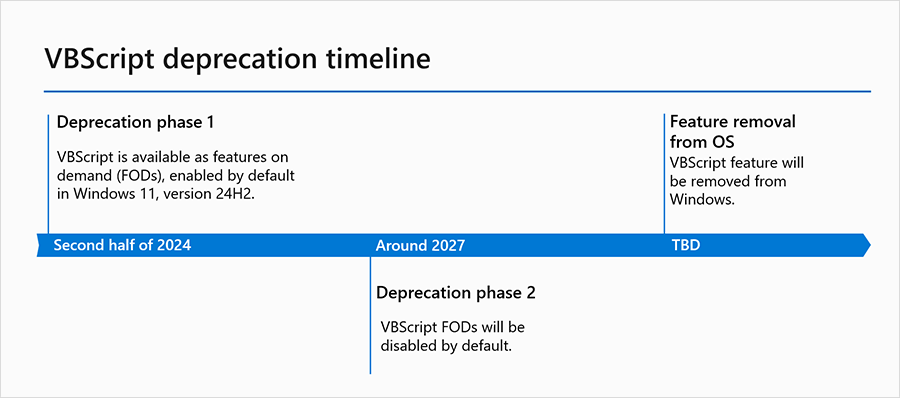
A visual timeline of important dates for VBScript deprecation phases.
At this time, Arden Software has no immediate plans to remove VBScript support from Impact. However, future Windows changes may affect VBScript availability at workstation level.
Customers who wish to discuss script migration options should contact their Impact support representative. Support teams can also help identify where VBScript references are present in an Impact environment.
Offline Virtual Machine (VM) Licensing
Impact can now retain activations for workstations identified as Virtual Machines (VMs). This can include systems identified as virtual due to one or more BIOS or Windows 10/11 security features.
This improvement prevents Impact from needing to be reactivated on each start-up, allowing affected workstations to continue operating offline in the same way as workstations identified as physical machines.
If the Nalpeiron activation servers are inaccessible, unresponsive or degraded, Impact can continue to function as normal for both new and ongoing sessions, provided the workstation remains within its valid lease period.
The default grace period before Impact must extend its lease through the Nalpeiron activation server, my.nalpeiron.com, is now 28 days for virtual machines. This matches the default behaviour for physical machines.
References
IM-818579
Updated Standards Libraries - v120
Impact 2026 includes the updated Standards Libraries v120 (aka Standards Sets), providing a larger and more clearly organised set of parametric styles for carton, corrugated, display, board, bag, PET/PP and related packaging work, with more than 400 new styles added.
The v120 libraries introduce a revised structure, increasing the number of libraries from 7 in v111 to 12 in v120, and increasing the total number of styles from 624 to 1030. Many existing standards have also been modified, corrected or reworked to address known issues and incorporate customer feedback.
The expanded library set includes new and updated designs across a wide range of practical packaging categories. Container board additions include drinks packaging, food boxes, gift boxes, additional tray styles and other non-food styles. Corrugated additions include bottle carriers, protective glass packaging, protectors and fitments, mail and cargo boxes, additional tray styles and the FEFCO 0800 Retail & E-commerce Packaging group. Display standards have also expanded, including additional floor standing, shelf ready and countertop display units.
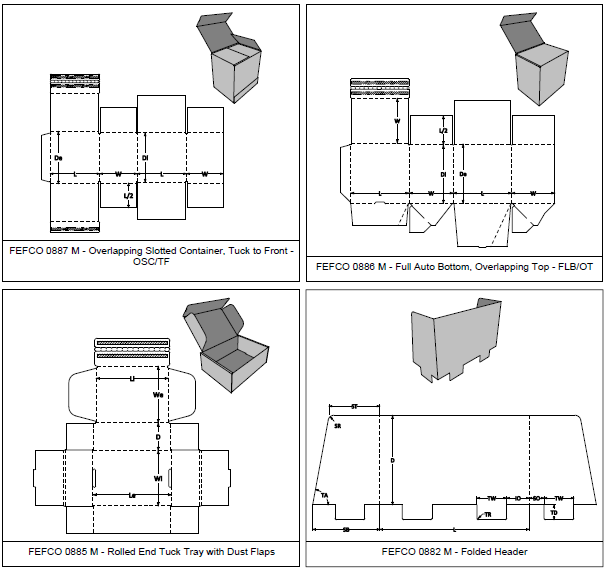
The FEFCO Corrugated library has been updated to match the FEFCO Code 12th Edition, including the new 0800 Retail & E-commerce Packaging group. Additional FEFCO styles have also been added across the existing FEFCO groups, ensuring the v120 catalogue set covers the FEFCO 12th Edition standards. A small sample is shown below.
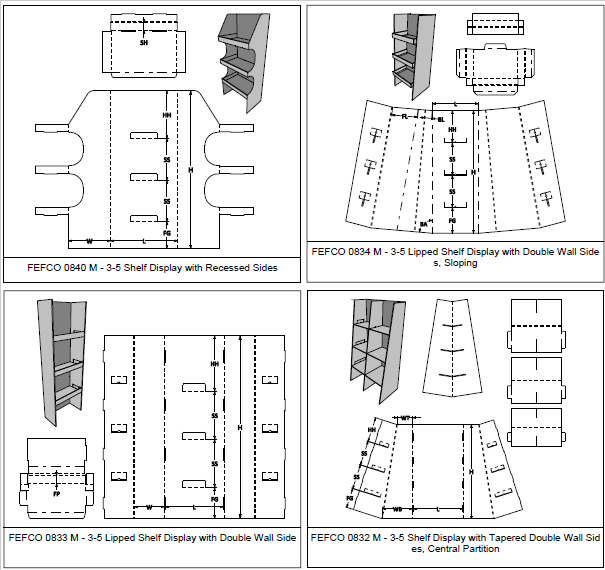
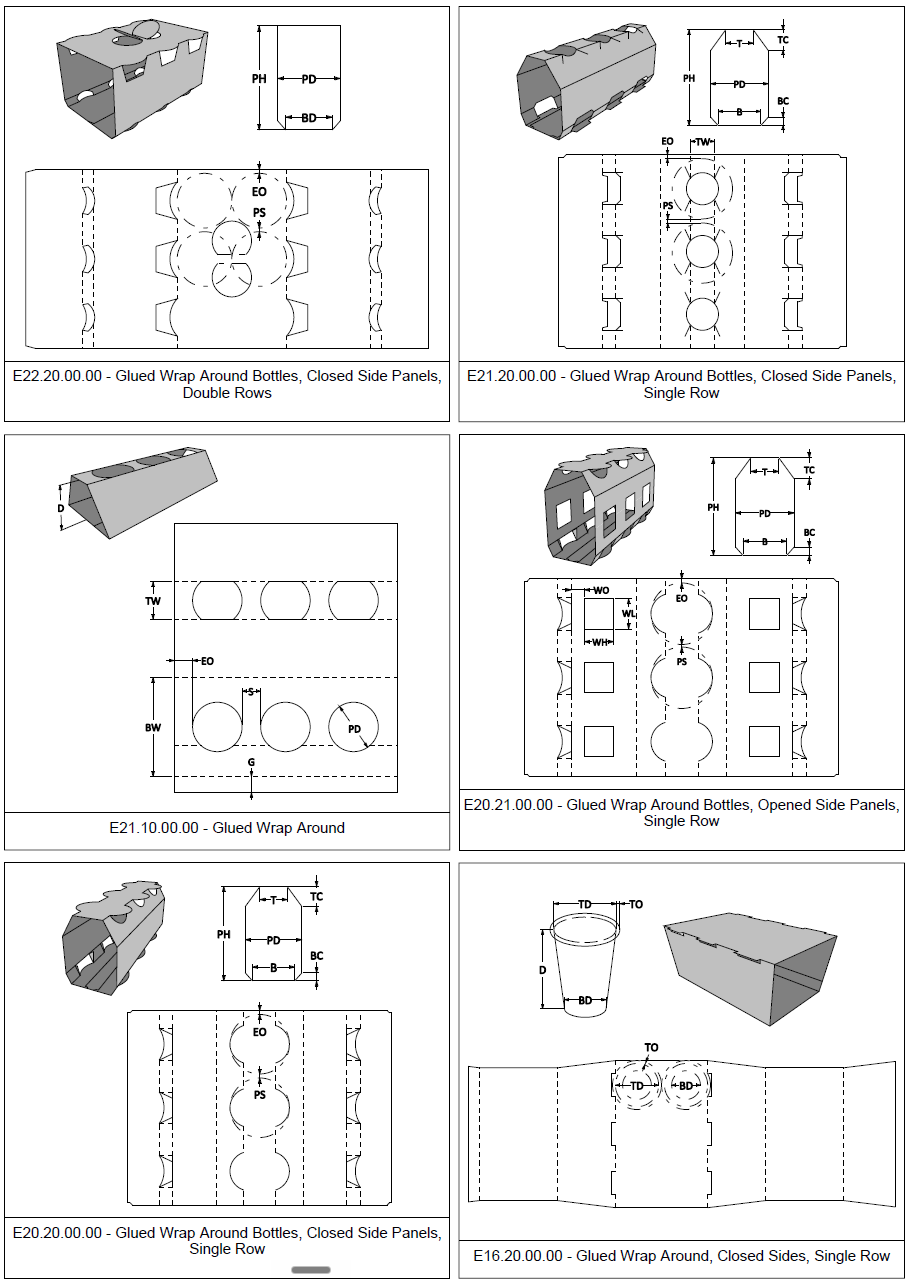
The ECMA Folding Carton library has also been expanded, including additional styles in Group E to improve coverage of the ECMA catalogue, including the following examples.
New and restructured libraries have been added for styles that are not easily classified under ECMA or FEFCO, including dedicated Folding Carton and Corrugated Board libraries. Additional libraries have also been introduced for Paper Bags, PET & PP and experimental ALU Composite styles.
The Standards Libraries v120 set includes the following libraries:
| Library | Styles in v120 | Notes |
|---|---|---|
| FEFCO Corrugated | 335 | Updated to match the FEFCO Code 12th Edition, including the 0800 Retail & E-commerce Packaging group. |
| ECMA Folding Carton | 255 | Expanded coverage, including additional Group E styles. |
| Displays | 142 | Expanded display style coverage. |
| Folding Carton | 82 | New library for assorted folding carton styles outside standard ECMA classification. |
| Corrugated Board | 81 | New library for assorted corrugated board styles outside standard FEFCO classification. |
| Rigid Paper Composite | 48 | Expanded rigid paper composite style coverage. |
| Rigid Solid Board | 20 | Expanded rigid solid board style coverage. |
| Paper Bags | 17 | New library for paper bag styles. |
| PET & PP | 14 | New library for PET and PP packaging styles. |
| Pocket Folders, Wraps & Envelopes | 17 | Restructured, with some styles moved to more appropriate libraries. |
| CD & DVD | 11 | Updated v120 catalogue set. |
| ALU Composite | 8 | Experimental library for aluminium composite style work. |
The Standards Libraries v120 catalogues provide visual previews of the full library contents. They include both new and pre-existing styles, so they should be treated as complete v120 reference catalogues rather than lists of only new additions.
Version 120 also includes underlying standards improvements, including revised material handling and common variable usage. This helps reduce dependency on incorrect material variable values in master tool settings and improves the predictability of calculated default values, including caliper or thickness-dependent values.
Standards Libraries v120 are compatible with Impact 2024 (14.0.1.0) and later, and will be made available for dowload shortly.
Other Enhancements
- Report Templates can now access layer revision comments - Users can now add layer revision comments and revision numbers to report templates by selecting from the newly exposed REVLAYER database table. This further complements the revision feature enhancements introduced in Impact 2024 (v14).
IM-817768 - Quick layer rename is now available from the layer context menu - It is now quicker and easier to rename an existing project layer without opening the full Layer Properties window. Users can right-click a layer, expand the Namecontext menu and enter a new name directly.
IM-812437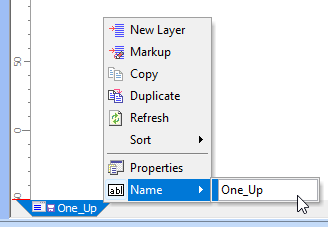
- Dynamic Constraints added to IViewSettings - The Impact COM API now includes controls for toggling the visibility of Dynamic Constraint icons and Underdefined Geometry.
IM-818047 - Designer type licences can now access and manage Cut Palettes master tool settings (MTS) - These settings are used by both the Create Common Knife Block and Stripping Knifetools. The Stripping Knife tool became available to Designer Professional level licences in Impact 2024.
IM-816208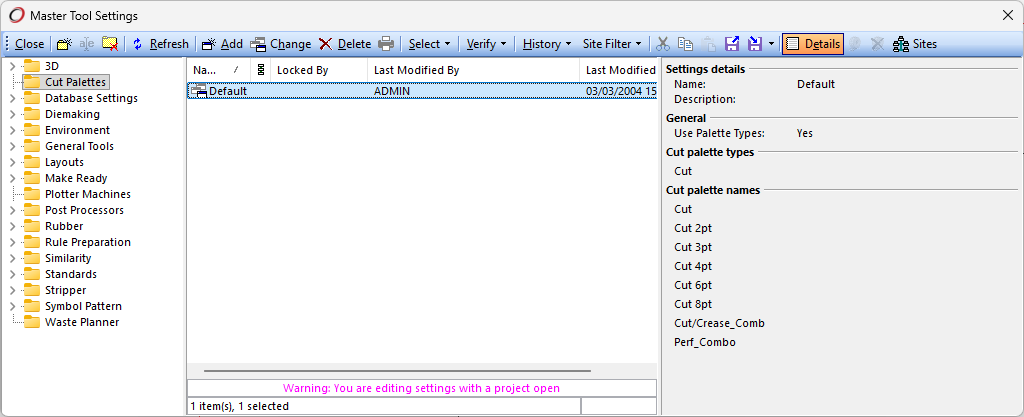
Administration Features
- Various Similarity data management tools have been added under Database > Administration > Tools > Similarity.
IM-817696
COM Enhancements
The following additions and changes have been made to Impact's COM interface. Please contact your support representative for help with these enhancements.
Support for Python-based scripting has been added to Impact, allowing users to write scripts using Python while maintaining compatibility with VBScript.
The initial implementation makes Python scripts available in the following areas:
- Impact Script Toolbox
- Custom Menu Items
- Database Window Button-type Fields
- Database Window Automation for Database Tasks (CUSTOMER table only)
- Impact Auto-Tasks (Database Installation > Automation > Auto-Tasks)
- Script Includes (Database Installation > Automation > Scripts - renamed from VBScript)
- Auto-Number Automation Script-type Parts
- Standards Designer > Geometry Construction Scripts
A new Language selection is available in the Script Toolbox, Script Include and Select Automation dialogs, allowing users to choose between VBScript and Python.

Python version 3.14.3 is embedded, meaning it is shipped and installed as part of Impact. There is no requirement to install Python separately.
The following objects, methods and properties are new in version 15.0:
- IViewSettings.underdefined_geometry
- IViewSettings.dynamic_constraints
Please refer to the COM API Documentation pages to access the online documentation for VBScript and Python. CHM-based VBScript documentation remains available for download or by request.
Enterprise
As noted in the Impact CAD 2026 (v15) Release Notes, an upgrade to Enterprise v13.0 is required for compatibility.
Enterprise v13.0 includes Design Similarity compatibility. This provides the underlying technology required by the Design Similarity feature, allowing users to search and open matching results across a wider Enterprise-connected system.
System Requirements
All system requirements should meet the minimum requirements set out in the hardware and software guide. For details, refer to Impact CAD 2026 (v15) System Requirements.
Resolved Issues
Impact 2026 includes a range of resolved issues. For the full fix list, including Impact v15.0.1.0 fixes, refer to the Impact CAD 2026 (v15) Release Notes.