
Similarity
Similarity Scan Rules
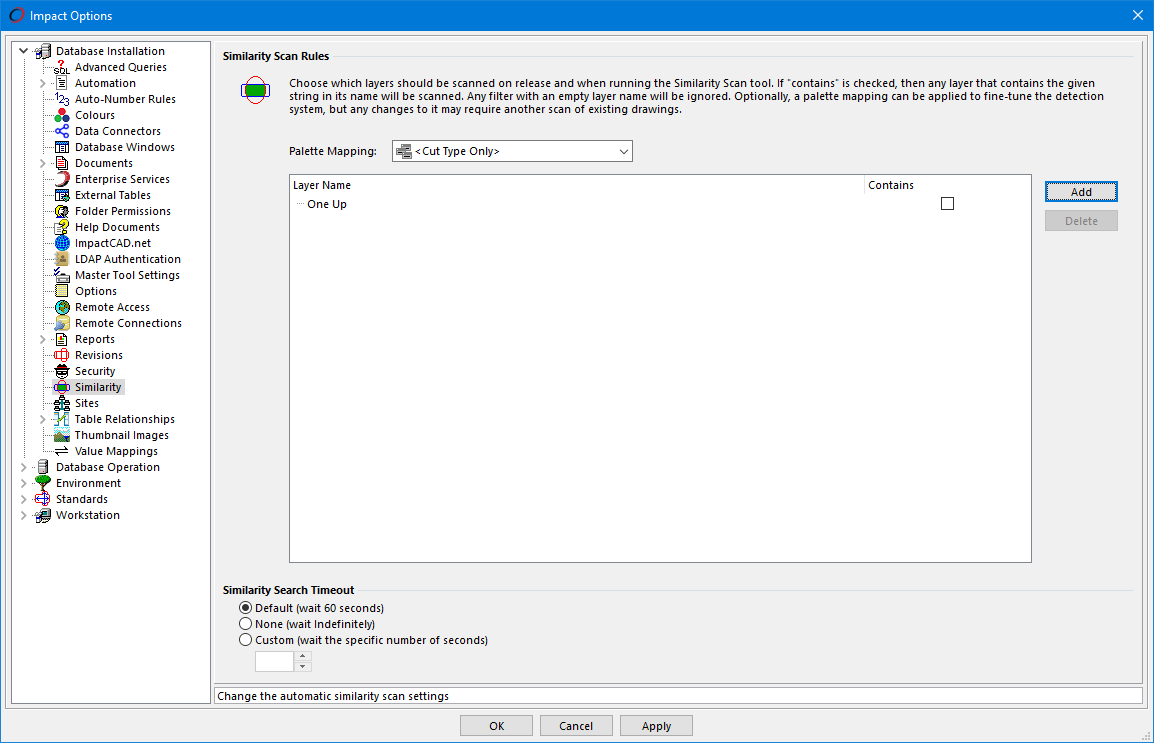
Here, you can define some options for the Similarity Scan tool. These include defining which palettes will be considered for similarity shape profiles and which layers should be searched for profiles. You can also set the search timeout value.
Palette Mapping
From the pulldown list choose the required Similarity > Palette Mapping master tool setting. If no such settings exist within the database, only the system option '<Cut Type Only>' will appear, which defaults to palette type 'CUT'.
Layer Name
Create a list of layer names that will be searched when looking for shape profiles. Switching on the Contains option means that the layer name can contain the text you've entered. Otherwise there must be an exact name match.
Click the Add button to add a new layer name and the Delete button to remove the selected one.
If no layer names are defined, ALL layers will be considered, regardless of name or type.
Similarity Search Timeout
This is the maximum time that Impact should wait whilst the database driver is performing a search on the tables.
- Default (as set in the Project Database Properties - Connection Timeout)
- None (wait indefinitely)
- Custom - enter the required number of seconds to wait
Feature Change History
The following changes have been made to this feature.
| History of Change | Version |
|---|---|
| This is a new node on the Database Installation page | 2026 |